
What happens when a potential client searches for your law firm on Google, but your listing has suddenly disappeared? No profile, no Google Maps visibility, and potentially fewer enquiries coming your way.
A suspended Google Business Profile can disrupt your local visibility when people are actively looking for legal help. But what caused the suspension, and how can you get your listing back? If your google business profile for lawyers has been suspended, this guide explains why it happens, how to appeal, what evidence you need, and how to protect your profile from future suspensions.
Key Takeaways
- Understand why Google suspends law firm profiles.
- Identify the mistakes that may trigger a suspension.
- Learn how to correct profile issues before appealing.
- Follow a step-by-step process to request reinstatement.
- Find out what to do if Google rejects your appeal.
- Prevent future suspensions with better profile management.
- Strengthen your firm’s local SEO beyond Google Maps.
Why a Suspended Google Business Profile Matters for Your Law Firm
For many people, finding a lawyer starts with a Google search. They might look for a personal injury attorney nearby, a family lawyer in their city, or a law firm that handles business disputes. They compare available options, check reviews, visit websites, and decide which firm to contact.
Your Google Business Profile helps your firm appear in local search results and Google Maps. It displays important details such as your address, phone number, business hours, website, and client reviews.
When Google suspends your profile, this information may no longer appear as expected. Your website might still show up in organic search results, but your local listing can become unavailable.
For your law firm, this can mean:
- Reduced local visibility: Potential clients may no longer find your firm in relevant local search results.
- Missed enquiries: People may struggle to access your phone number, website, or business details through your listing.
- Lost opportunities: Competing firms with active profiles may receive enquiries from people who could have considered your practice.
- Interrupted reputation building: Your reviews and business information may no longer be accessible through your profile.
- Uncertainty about recovery: Without understanding the suspension, you may waste time making changes that do not address the actual problem.
A suspension does not automatically mean Google has penalised or removed your website from organic search. It means you need to investigate the profile restriction and follow the appropriate reinstatement process.
The first priority is to identify the issue rather than rush into making changes.
Why Google Business Profile Is Important for Law Firms
A Google Business Profile is often one of the first places potential clients encounter your firm. It helps them understand where you operate, what services you offer, and how they can contact you.
Recent research also highlights how much people rely on online reviews when evaluating local businesses.
According to BrightLocal’s Local Consumer Review Survey 2026:
- 97% of consumers read online reviews for local businesses.
- Consumers use an average of six different review sites when choosing a business.
- 85% of consumers are more likely to use a business after reading positive reviews.
- 54% of consumers visit a business’s website after reading positive reviews.
For law firms, a well-maintained google business profile for law firms can support local discovery and help potential clients take the next step. It should work alongside your website, legal content, and wider SEO strategy.
Is Your Law Firm Losing Local Visibility?
A suspended listing can expose weaknesses in your wider search presence. Find out whether your website, local listings, and SEO strategy are helping potential clients discover your firm.
What Causes Google to Suspend a Law Firm’s Business Profile?
Google may suspend a Business Profile when it identifies information or activity that does not comply with its guidelines. Sometimes the reason is obvious. In other cases, you may need to review several aspects of your listing.
Here are six common issues law firms should check.
1. Keyword Stuffing in Your Business Name
Your profile name should reflect your firm’s real-world business name.
Adding extra search terms to improve rankings can violate Google’s guidelines.
For example:
- Correct: Harris Legal Group
- Incorrect: Harris Legal Group – Best Personal Injury Lawyers in Chicago
If your firm’s actual name is Harris Legal Group, adding promotional phrases or practice-area keywords makes the listing inaccurate.
2. Using an Ineligible Business Address
Address-related problems are particularly important for law firms.
Some firms use virtual offices, mailing addresses, or shared workspaces without checking whether those locations qualify.
Google generally does not allow virtual offices as profile locations. A coworking office must meet specific requirements, including clear signage, customer access during business hours, and staffing by your business during those hours.
If your firm travels to clients and does not receive them at its location, you may need to configure your profile as a service-area business.
3. Inconsistent Business Information
Your firm’s name, address, phone number, and website should accurately represent the same business.
Check whether:
- Your website displays an outdated office address.
- Your profile uses an inactive phone number.
- Your firm has moved but the listing still shows the previous address.
- Different directories display different business names.
- Your profile links to an outdated website.
These inconsistencies do not automatically cause suspension, but they can create confusion about your business information.
4. Duplicate Business Profiles
Your firm may accidentally have multiple listings after changing its office location, rebranding, or working with different marketing agencies.
For example, a previous agency may have created a profile for your old office while your current team creates another one for the new address.
Review existing listings before creating or claiming another profile.
5. Frequent or Significant Profile Changes
Have you recently changed your firm’s name, address, phone number, website, and categories within a short period?
Significant changes may prompt additional scrutiny, especially when the updated information does not match other sources.
Only make changes when there is a genuine business reason. Avoid repeated edits simply to test whether they improve visibility.
6. Violating Google’s Business Profile Guidelines
Other issues may involve inaccurate categories, misleading business information, or content that does not comply with Google’s policies.
This is why attorney google business profile optimization should focus on accurate business representation rather than shortcuts designed to manipulate local search results.
Not Sure What Triggered Your Profile Suspension?
Before submitting an appeal, identify the issue behind the suspension. A review of your local SEO setup can help uncover inconsistent information and other visibility problems.
Suspended vs. Disabled vs. Unverified: Understand Your Profile Status
Before trying to recover your listing, make sure you understand what has actually happened. A suspended profile, a disabled profile, and an unverified listing are not necessarily the same situation.
| Profile status | What it means | What you should do |
| Suspended profile | Google has restricted the Business Profile, often because of a policy issue. | Review the guidelines, correct violations, and follow the reinstatement process. |
| Disabled profile | The profile has been disabled or removed from public access. | Check the restriction details and follow Google’s available recovery instructions. |
| Unverified profile | Your business has not completed Google’s verification process. | Complete the verification method offered by Google. |
| Restricted Google account | The account managing the profile has been restricted. | Resolve the account-level restriction before addressing the affected profile. |
Why does this distinction matter?
Because the solution depends on the restriction. For example, if your Google account is restricted, appealing only the Business Profile may not resolve the issue.
Check your profile status and any notification from Google before taking further action.
Step-by-Step Process to Recover a Suspended Google Business Profile
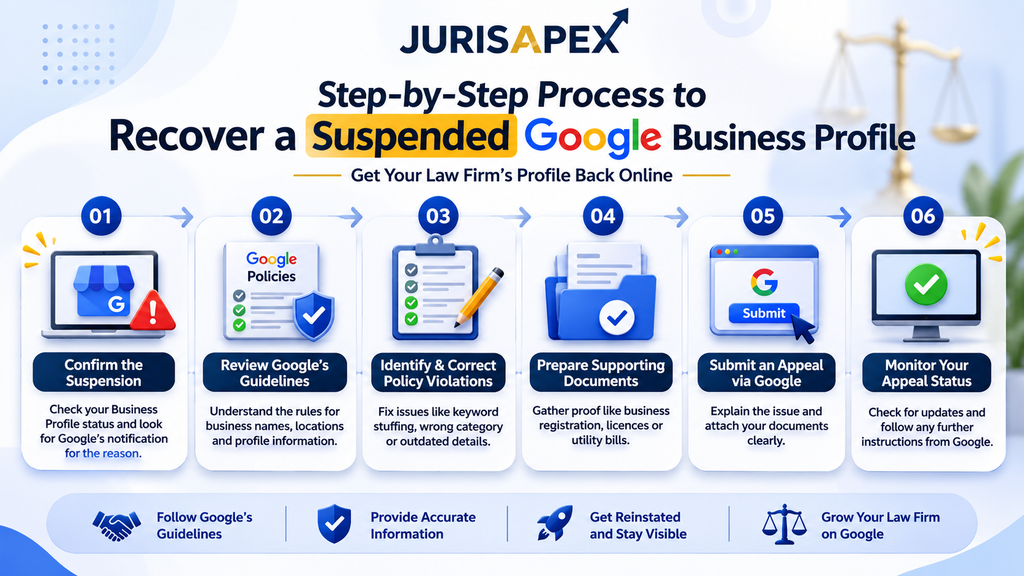
Once you understand the possible reason for suspension, you can start working towards reinstatement. Follow these steps in order rather than making random changes or submitting an appeal immediately.
Step 1: Confirm the Suspension
Sign in to the Google account that manages your law firm’s Business Profile.
Check the profile status and look for an email or notification from Google explaining the restriction.
Confirm whether:
- Your Business Profile has been suspended.
- Your profile has been disabled.
- Your Google account has been restricted.
- Your profile is awaiting verification.
- A particular profile edit has been rejected.
This distinction will help you identify the correct recovery route.
Step 2: Review Google’s Business Profile Guidelines
Before changing anything, read Google’s official guidelines for representing your business.
Pay particular attention to:
- Business names and real-world branding.
- Physical locations and service areas.
- Business eligibility.
- Address accuracy.
- Duplicate listings.
- Business categories and profile information.
Compare each requirement with your current listing.
For example, if your firm operates from a shared office, check whether it meets Google’s location requirements. If your business name includes additional keywords, make sure it accurately reflects your real-world name.
Step 3: Identify and Correct Policy Violations
Once you understand the possible reason for suspension, correct the relevant information.
Use this quick checklist:
| Possible issue | Recommended correction |
| Keyword-stuffed business name | Use your firm’s actual business name. |
| Ineligible office address | Check the location against Google’s eligibility rules. |
| Virtual office | Confirm whether the location qualifies under Google’s guidelines. |
| Duplicate listing | Identify the correct profile representing the business. |
| Incorrect category | Select a category that accurately describes your firm. |
| Outdated contact details | Correct your phone number, website, and business information. |
| Account restriction | Resolve the account-level issue first. |
Keep a record of the corrections you make. This will help you explain the situation if Google requests additional information.
Step 4: Prepare Supporting Documents
This is one of the most important parts of the recovery process.
Google may ask you to provide evidence showing that your business is legitimate and that the information on your profile is accurate.
Depending on your circumstances, useful documents may include:
- Official business registration documents.
- Business licences, where applicable.
- Tax certificates.
- Utility bills for your business, such as electricity, phone, or internet bills.
- Other official records supporting your business identity and location.
For a law firm, business registration documents and office-related records may be particularly useful.
Before submitting anything, check that the business name and address on your documents match the information on the profile you are appealing.
If your firm has recently moved or changed its name, be prepared to explain the difference.
Step 5: Submit an Appeal Through Google’s Appeals Tool
After correcting the relevant issues and preparing your evidence, open the Google Business Profile appeals tool.
The general process is:
- Sign in using the Google account associated with your profile.
- Open the appeals tool.
- Select the suspended profile you want to reinstate.
- Review the restriction details and policy information displayed.
- Select the decision you want to appeal.
- Submit your appeal.
- Attach supporting documents if the tool provides the option.
Your appeal should be clear, factual, and focused on the issue.
Explain what your firm does, what you reviewed, and what corrections you made. Mention the documents you are providing and how they support the information in your listing.
Avoid emotional explanations, unnecessary details, or claims you cannot verify.
A useful appeal should explain three things:
- What happened to your profile.
- What you corrected to comply with Google’s guidelines.
- What evidence supports your firm’s business information.
Google’s published guidance currently describes an evidence submission window of 60 minutes when the separate evidence form is presented after an appeal. Follow the instructions and deadline displayed in your actual appeal flow, as the interface may change.
Step 6: Monitor Your Appeal Status
Once your appeal is submitted, monitor its status through the appeals tool and check the email associated with your Google account.
Google states that appeal reviews and decisions can take up to five business days. This is not a guaranteed reinstatement timeline.
While waiting:
- Avoid unnecessary profile changes.
- Do not create another profile for the same business.
- Keep your supporting documents accessible.
- Check your email for Google’s decision.
- Avoid submitting duplicate appeals for the same issue before receiving a response.
If Google approves your appeal, follow any instructions provided and check that your profile information is accurate once it becomes available again.
What to Do If Google Rejects Your Reinstatement Appeal
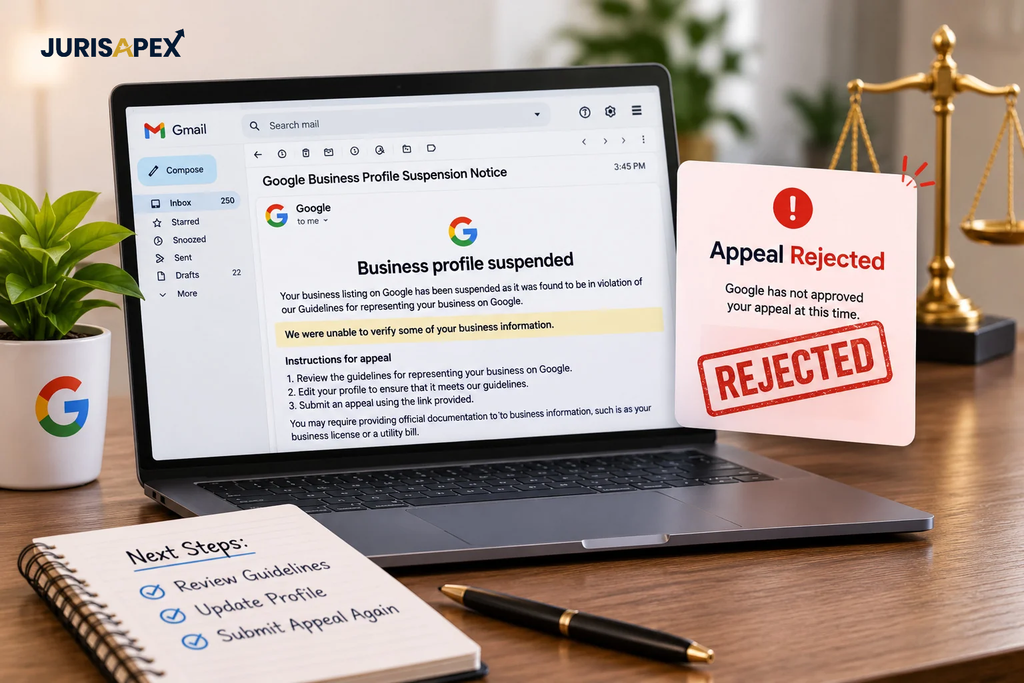
A rejected appeal can be frustrating, particularly when your firm has already spent time reviewing its listing and gathering documents.
However, submitting the same appeal repeatedly or creating a new listing is not the right response.
Start by reviewing Google’s decision and checking whether any unresolved issues remain.
Ask yourself:
- Did I correct the policy issue before appealing?
- Does the business name match my firm’s real-world branding?
- Is the office address eligible?
- Do my documents support the profile information?
- Did I select the correct profile?
- Is there a separate Google account restriction?
If you discover an issue, address it before taking further action.
Google also provides an option to request an additional review in certain denied reinstatement cases. This may allow you to submit further evidence that was not included in your original appeal.
For firms with multiple locations, check each profile carefully. A problem with one office does not mean you should make unnecessary changes to every other listing.
The important thing is to understand why the appeal was rejected before deciding what to do next.
How to Prevent Future Google Business Profile Suspensions
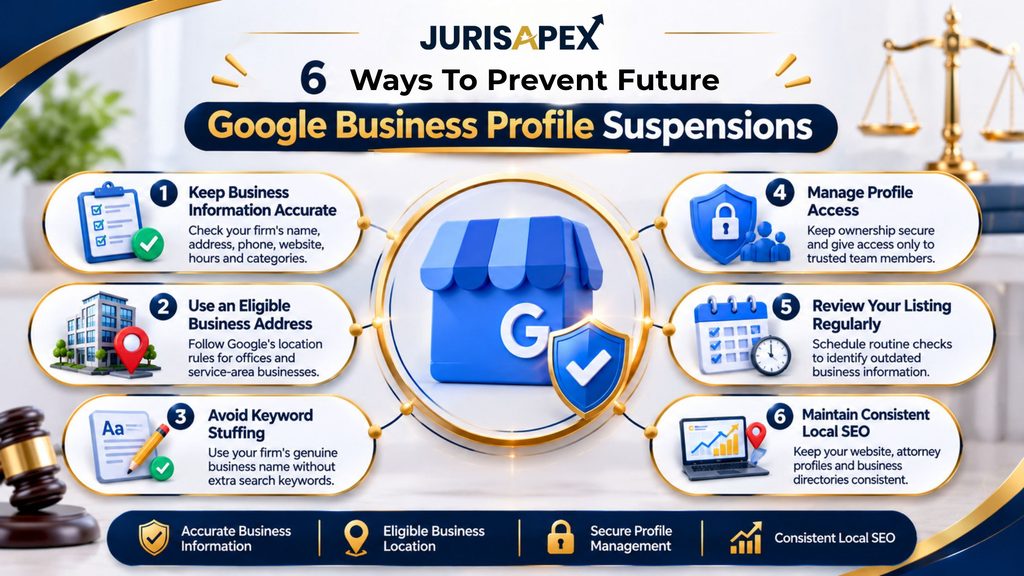
Getting your listing reinstated is a significant step, but maintaining it correctly is just as important.
Follow these practices to reduce avoidable profile issues.
Keep Your Business Information Accurate
Review your firm’s business details regularly.
Check your:
- Business name.
- Office address or service area.
- Phone number.
- Website.
- Business hours.
- Primary and additional categories.
- Listed legal services.
If your firm relocates or changes its contact information, update the profile carefully and make sure your website and other business listings reflect the correct details.
Use an Eligible Business Address
Do not assume that every office or mailing address can be used for a Business Profile.
Check Google’s requirements before listing a virtual office, coworking space, or shared location. If your firm operates as a service-area business, configure the profile accordingly.
Avoid Keyword Stuffing
Your business name should represent your firm, not act as a list of search terms.
Use your website’s practice-area pages and relevant content to explain your legal services. Keep your profile name accurate.
This is an essential part of responsible attorney google business profile optimization.
Manage Profile Access Carefully
Make sure only the appropriate people have access to your firm’s listing.
If you work with an SEO agency or marketing provider:
- Keep ownership of the main Google account.
- Give team members suitable access.
- Remove access when a working relationship ends.
- Keep account recovery information up to date.
- Avoid sharing passwords unnecessarily.
Your firm should retain control over its business information and profile access.
Review Your Listing Regularly
Set a schedule to check your profile information. This is particularly important for firms with multiple locations or several people managing their marketing.
A regular review can help identify outdated information before it becomes a larger problem.
Maintain Consistent Local SEO Information
Your Google listing should not operate in isolation.
Your website, attorney profiles, business directories, and other local listings should present consistent information about your firm.
A strong google business profile for lawyers strategy should work alongside useful location pages, relevant legal content, accurate citations, and a technically sound website.
How a Suspended Google Business Profile Affects Your Law Firm’s SEO
A profile suspension can affect local visibility, but it is important to understand what it does and does not mean.
It does not automatically mean that your website has been removed from Google’s organic search results. Your website may continue to appear for relevant searches even when your Business Profile is suspended.
However, losing your listing can affect how people discover your firm through local search.
Your Google Maps Visibility May Be Affected
Google Maps and local search results help people discover nearby businesses and professional services.
When your profile is suspended, your firm may lose an important opportunity to appear in these results. Potential clients may instead see other firms with active listings.
Your Website Becomes More Important
While your listing is unavailable, your website remains an important way for potential clients to find and evaluate your firm.
Make sure your website includes:
- Dedicated pages for your main legal practice areas.
- Accurate office and contact information.
- Attorney biographies and professional credentials.
- Relevant location-specific content.
- Clear contact forms and enquiry options.
- Helpful answers to common legal questions.
These elements help visitors understand your services and give search engines useful information about your practice.
Your Local SEO Strategy Should Not Depend on One Listing
A strong local SEO strategy brings several elements together:
- An accurate Google Business Profile.
- Consistent business information across relevant directories.
- Useful practice-area and location pages.
- Genuine client reviews.
- A technically sound website.
- Relevant, helpful legal content.
This is why google my business for lawyers should be treated as one part of a broader search strategy.
At JurisApex, law firm SEO focuses on more than profile visibility. It also considers technical website health, content opportunities, local relevance, and ways to turn relevant website visitors into enquiries.
Why Your Law Firm Needs a Long-Term Google Business Profile Strategy
Recovering a suspended listing solves the immediate problem. But if your firm continues managing its profile without a clear process, similar issues may return.
A consistent strategy should cover four important areas.
1. Profile accuracy
Make sure your business name, address, contact information, categories, and services accurately represent your firm.
2. Local relevance
Connect your profile with useful location pages, relevant legal services, and consistent business information across appropriate directories.
3. Reputation management
Encourage genuine client feedback in line with applicable professional and advertising rules. Respond professionally and avoid pressuring clients to leave positive reviews.
4. Performance tracking
Monitor available performance data, website visits, calls, and qualified enquiries. Rankings alone do not tell you whether your local SEO is attracting the right potential clients.
Effective attorney google business profile optimization is not about adding as many keywords as possible or making constant edits. It is about maintaining an accurate, useful profile that supports your firm’s wider digital presence.
Build a Stronger Local SEO Foundation for Your Law Firm
Your Google listing is only one part of how potential clients discover your practice. JurisApex helps law firms identify SEO gaps, improve local visibility, strengthen website performance, and attract more relevant enquiries.
Wrapping Up
A suspended Google Business Profile for lawyers can interrupt your law firm’s local visibility when potential clients are actively searching for legal help. But rushing into profile changes, creating another listing, or submitting repeated appeals can make the situation more complicated.
Start by confirming the suspension, reviewing Google’s guidelines, correcting the underlying issue, and preparing documents that support your firm’s business information. Then submit a clear appeal and monitor the decision.
Once your profile is reinstated, focus on maintaining accurate details and building a consistent local SEO strategy. A well-managed google business profile for law firms can support local discovery, but your website, content, reputation, and technical SEO all contribute to long-term visibility.
If you are unsure where your firm’s local search presence stands, a structured SEO audit can help identify the gaps and determine what needs attention first.
Frequently Asked Questions
Google may suspend a profile when its information or setup does not meet its guidelines. Common issues include inaccurate names, ineligible addresses, duplicate listings, and policy violations.
Google states that appeal reviews and decisions can take up to five business days. Actual resolution may vary depending on the issue, evidence submitted, and further action required.
No. Google advises against creating another profile for the same business while an appeal is under review. Resolve the existing listing through the official reinstatement process.
Depending on your circumstances, useful evidence may include business registration documents, licences, tax certificates, and utility bills. Ensure the business name and address match your profile.
A profile suspension does not automatically remove your website from organic search results. However, your local listing and visibility in Google Maps may be affected.
Yes, it can. Google generally does not allow virtual offices as profile locations unless they meet its eligibility requirements, including being staffed by the business.
Use accurate business information, maintain an eligible address, avoid keyword-stuffed names, manage account access carefully, and review Google’s guidelines before making significant changes.